 Graphite
Guides / 14 of 15
Write a Novel in a Month
A calm plan for writing 50,000 words in November: the daily numbers, catching up, and keeping the draft safe.
Writing a novel in a month usually means one thing: 50,000 words of a first draft between 1 and 30 November. That’s about 1,667 words a day, every day, for 30 days. It’s a lot, but it’s a known amount, and a known amount can be planned for. This guide covers the arithmetic, the preparation, and what to do on the days it goes wrong.
It’s useful whatever you write in. Where Graphite helps, we say how.
What the challenge is, and isn’t
The November novel challenge is simple: start a novel on 1 November and reach 50,000 words by the end of 30 November. The organisation that used to run the event closed in 2025, but the challenge never really belonged to anyone. Writers keep doing it alone, with friends or in local groups.
What it isn’t: a finished novel. A first draft written at this pace will be rough, and that’s the point. The month is for getting a whole story out of your head and onto the page, so that you have something real to revise. Nobody is checking, so the rules are yours. Some people continue a draft they already started; some write a set of stories. Decide what counts before you begin, and hold yourself to it.
The numbers: words a day, and catching up
50,000 ÷ 30 = 1,666.7, so 1,667 words a day keeps you exactly on pace. A few ways to look at it:
- In time: at 30 words a minute, that’s under an hour of typing a day; at 20, about an hour and a half. Time a few sessions before you start and you’ll know your own pace.
- In weekdays: November 2026 has 21 weekdays and 9 weekend days. Write only on weekdays and you need about 2,381 a day. Write 1,000 on each weekday and the weekends need about 3,223 a day.
- As a cushion: every day you finish above 1,667 is credit for the day you can’t write at all.
When you fall behind, don’t try to make up the missed days in one sitting. Spread the gap over the days that are left. If you’re at 5,000 words on the morning of 8 November, you need 45,000 words in 23 days: about 1,957 a day. Harder, not hopeless.
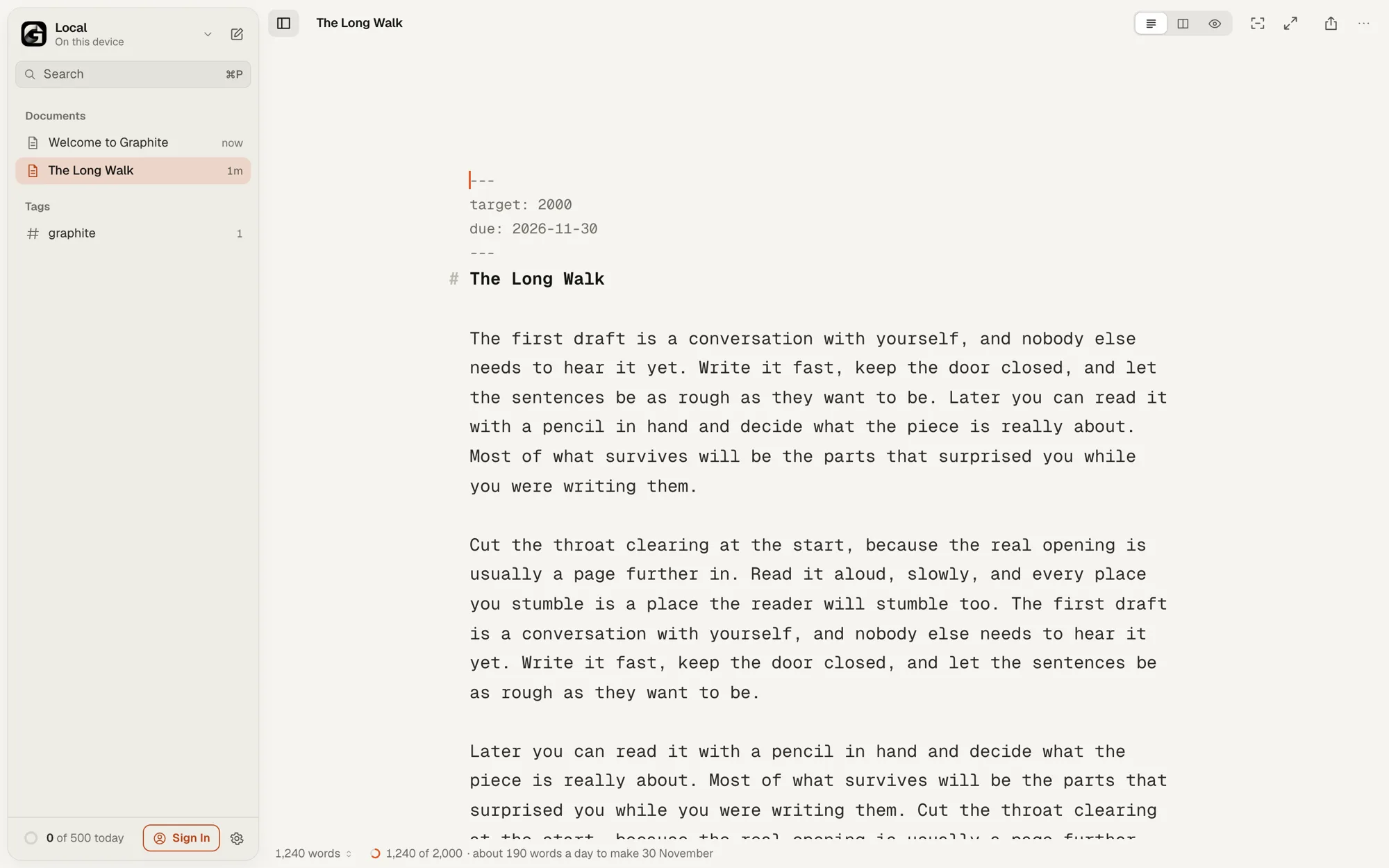
In Graphite this sum is done for you. Click the document’s title, choose Set Word Target…, type 50,000 under Words and set the Deadline to 30 November. The status bar shows your progress and the pace to keep, such as “about 1,670 words a day to make 30 November”, and works it out again as you write, or as you fall behind. It counts every day left, today included. How word targets work.
Set your daily goal to match, under Settings › General: the ring at the bottom of the sidebar fills as you write, and your streak counts the days in a row you reach it. Only words you type count, and deleting never takes words away from today’s total, so cutting a bad paragraph doesn’t cost you the day. Daily goals, streaks and sprints.
Plan in October, or start cold
Some writers outline every chapter; others start with a character and a problem and find the rest by writing. Both can work in a month. Either way, settle a few things before 1 November, so the first mornings go to writing, not deciding:
- Who the main character is, what they want, and what’s in the way.
- Roughly how it ends, even if that changes.
- Where and when you’ll write each day, and for how long.
- Where the draft will live, and where its backup will live.
One document or a document per chapter? A word target belongs to one document, so writing the month in a single document lets the status bar track the whole novel. If you prefer chapters, put them in one folder and choose Make Manuscript… from the folder’s menu: Graphite lists them in order, each with its word count, and the total at the bottom. Your daily goal counts words across every document either way. Folders, Tags and Search.
If you’re reading this after 1 November, start anyway. A cold start just means more of the discovering happens on the page.
Write now, edit in December
The quickest way to stall is to go back and fix chapter one. In November, write forward. If a character needs a new name or a scene belongs earlier, leave a note in the text, such as [TODO: move to chapter 2], and keep going. Fixing is December’s job.
Let the screen help. Focus (⌘D) fades everything except the sentence you’re writing, which makes it harder to wander back and polish. Zen (⇧⌘F) goes full screen with Focus and Typewriter Scrolling on, and a hairline along the bottom fills as you approach today’s goal. On a slow day, start a sprint of 10, 25 or 45 minutes from the Writing Habit sheet: it runs in Zen and shows your words and pace when the time is up. Focus, Typewriter and Zen.
Protect the draft: backups and versions
A month of work shouldn’t exist in one place only. Whatever you write in, keep a second copy somewhere else, and check now and then that it really opens.
- Graphite saves a moment after you stop typing, and keeps a version every ten minutes in Version History. The free version shows the latest 5.
- Back Up Library…, in the library menu, saves every document as one
.zipof Markdown files. Do it every Saturday: 7, 14, 21 and 28 November. - A library in a folder on your disk or in your own Google Drive keeps the files outside the browser. If you write in the browser’s storage, choose Keep Permanently in Settings › General.
- Graphite works offline once it has loaded, so a train or a dropped connection doesn’t stop the day’s words.
Keep Your Work Safe covers each of these.
When you fall behind
Falling behind is normal. What matters is the next day, not the last one.
- Recalculate, then stop looking. Spread the gap over the days left, as above, and get on with today.
- Lower the bar for a day. 300 words keeps the story warm, and the next day starts easier.
- Skip the stuck scene. Write the next scene you can see clearly, and come back later.
- Use a short sprint. Ten minutes is easier to begin than an evening.
- Change the target if you need to. Deciding on 20 November that 30,000 words is your month is a choice, not a failure. Click the progress in the status bar to change it.
What to do on 1 December
- Back it up, then rest. A week or two away helps you read it with fresh eyes.
- Read it through once before changing anything, making notes as you go.
- Revise the structure first, sentences last. There’s no point polishing a scene you’ll cut. When you get to sentences, Revise With Fresh Eyes shows how Style Check and Syntax Highlight point things out without rewriting anything, and Compare in Version History shows what changed, word by word.
- Not finished? Keep going at a pace you can hold. How Many Words a Day to Finish a Book works out the new number.
A short checklist
- Decide what counts: a new novel, a continued draft or a set of stories.
- Set a target of 50,000 words due 30 November, and a daily goal of 1,667.
- Choose when and where you’ll write each day.
- Pick one place for the draft and another for its backup.
- Write forward; leave notes instead of fixing.
- Back up every Saturday.
- On 1 December, rest before you revise.
Start writing, free, in your browser. No account needed.